
The standards, implemented properly
Your applications should not need a bespoke SDK to talk to your identity provider. BlackWall speaks OAuth 2.1 and OpenID Connect the way the specifications describe them, so mainstream libraries configure themselves from one discovery URL and simply work.
Consent that tells the user the truth
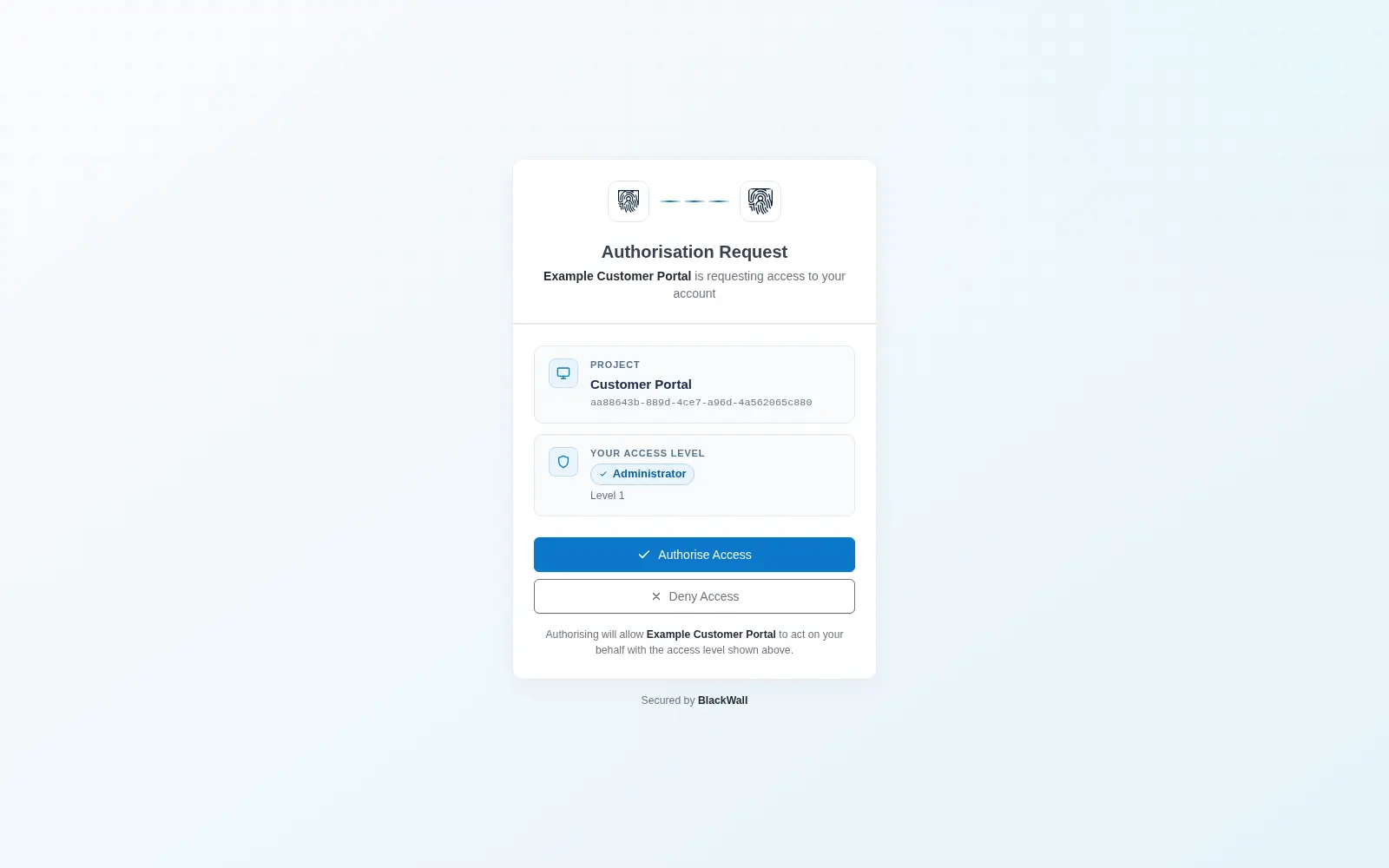
The authorisation screen names the application, the project it belongs to, and the exact privilege level the user is about to grant it. No vague "this app would like to access your account" — the user sees the scope of what they are approving.
- Mandatory PKCE — S256 only, enforced on every flow, including confidential clients.
- Project context — every issued token carries the project it was issued for.
- Privilege claims —
privilege_levelandprivilege_nametravel inside the token. - Authentication freshness — re-authentication is enforced rather than assumed.
A flow with no weak link
The authorisation code flow is only as strong as its weakest step. BlackWall closes the usual gaps by policy rather than by configuration you might forget to set.
-
The application redirects
Your app sends the user to BlackWall with a PKCE challenge. Plain challenges are rejected — S256 is the only accepted method.
-
The user proves who they are
A WebAuthn assertion, bound to the BlackWall origin. There is no password step to phish or replay.
-
They grant a named privilege
The consent screen states the client, project and privilege. The decision is written to the audit log with a correlation ID.
-
Your app exchanges the code
The code is single-use and must arrive with the matching PKCE verifier. Tokens come back as signed JWTs or opaque handles.
-
You verify, revoke or introspect
Validate JWTs against the JWKS endpoint, or ask the introspection endpoint about opaque tokens. Revocation takes effect immediately.
Client registration without guesswork
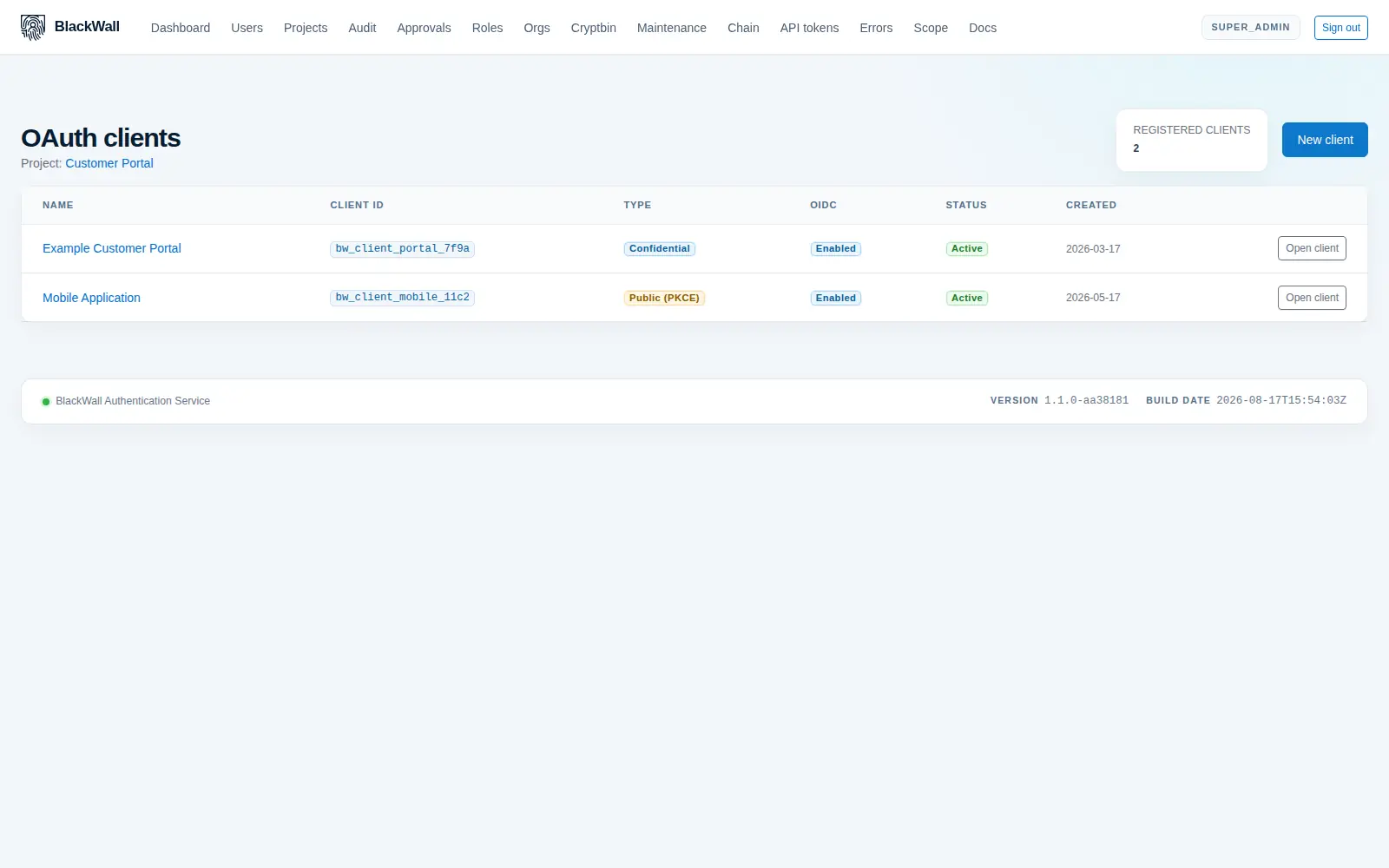
Register confidential or public clients per project, decide whether they issue OpenID Connect identity tokens, and pin their redirect URIs. Secrets are shown once and stored hashed.
- Confidential and public clients — server-side apps, SPAs and mobile, each with the right rules applied.
- Exact redirect URIs — no wildcard matching, so an open redirect cannot be engineered.
- JWT or opaque tokens — signed RS256 tokens your services verify locally, or opaque handles you introspect.
- Custom claims — attach organisation-specific claims with recorded provenance.
Discovery
A standards-compliant document at /.well-known/openid-configuration lets OIDC-aware libraries configure themselves from one URL.
JWKS
Published signing keys so your services verify identity tokens locally, with overlap during rotation so in-flight tokens keep validating.
UserInfo
A standard endpoint returning the claims a client is entitled to see for the authenticated subject.
Revocation & introspection
RFC 7009 revocation and RFC 7662 introspection, so a withdrawn token stops working rather than merely expiring eventually.
/.well-known/openid-configuration — point a library at it and see for yourself.